Inventory and supply automation · MiniBot for Windows

Auto Depositor for Minibia: connect hunts, depots and supplies

MiniBot Auto Depositor helps organize the transition between a hunt and the depot. Set capacity or supply thresholds, configure inventory destinations and plan the route that returns your character to the hunt.

Home›Features›Auto Depositor
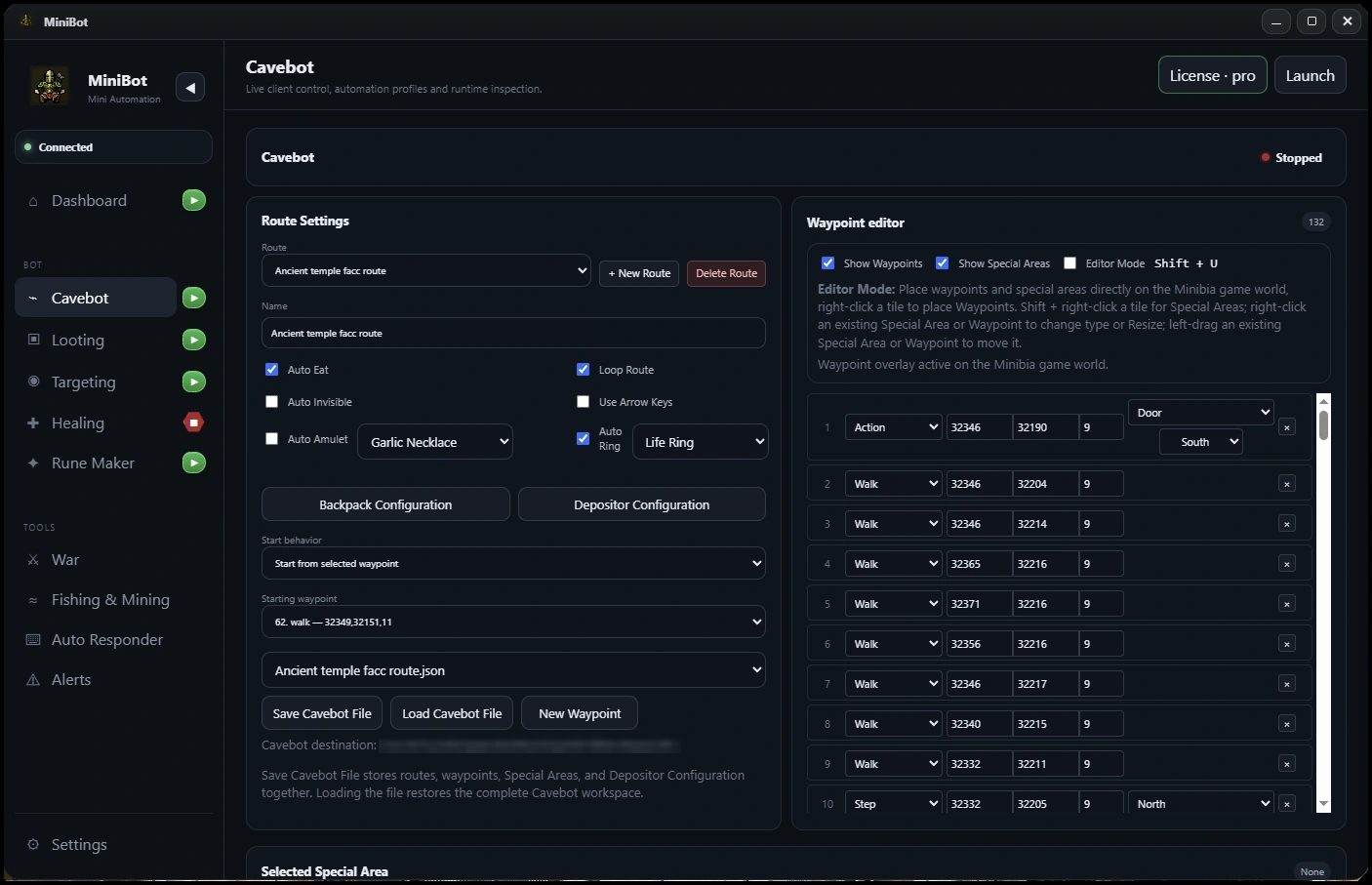
MiniBot Cavebot and Auto Depositor configuration workflow in the Minibia desktop companionActual MiniBot interface
Inside MiniBot

Auto Depositor features explained

Explore how this tool fits into a complete Minibia desktop automation workflow.

01 / Inventory and supply automation

Define when to leave the hunt

A hunting route eventually needs a supply decision. MiniBot provides supply and capacity checks to help switch the Cavebot to a designated route when configured conditions are met. This avoids depending on a manual reminder to open the depot workflow.

  • Capacity-based checks
  • Supply threshold configuration
  • Route selection for supply runs
02 / Inventory and supply automation

Keep backpacks and deposited items organized

Configure backpack roles and loot destinations before starting an automated run. The aim is to keep carried supplies distinct from collected items and make your return-to-depot configuration predictable.

  • Depositor setup
  • Backpack and inventory destinations
  • Integration with loot configurations
03 / Inventory and supply automation

Link resupply and hunting routes

Treat the depot route as part of a complete Cavebot plan: navigate out of the hunt, handle configured deposit or supply steps, then resume your intended route. Test each transition in-game, especially around doors, floor changes and access requirements.

  • Cavebot route integration
  • Deposit and resupply configuration
  • Return-to-hunt route planning
Frequently asked questions

Auto Depositor FAQ

What is the MiniBot Auto Depositor?

It is the deposit and supply workflow configuration that complements Cavebot routes.

Can MiniBot react to low supplies?

MiniBot has supply and capacity check settings that can change the configured route.

Do I need Cavebot for depot routing?

Auto Depositor workflows are built to work with Cavebot route and waypoint settings.

One Minibia automation toolkit

Configure your next hunt.

Explore MiniBot for Windows, then choose your subscription when you're ready.

Download MiniBot →