


1
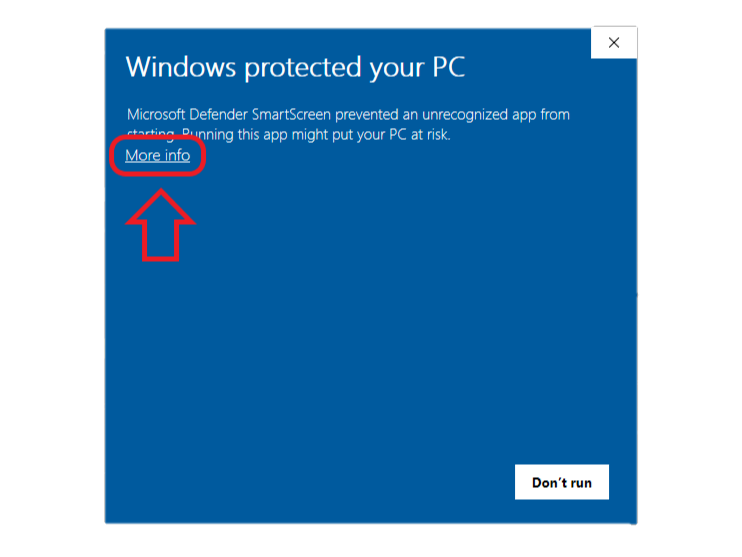
Select “More info”
When Windows Defender SmartScreen displays the warning, select “More info” to view the installer details.
Sign in and activate MiniBot Pro to unlock the Windows installer. Your desktop license is also checked after installation.
Want to try a Minibia bot free for 3 days? Create a MiniBot account to start your trial. Installer access depends on your account eligibility.
An active MiniBot Pro subscription is required to enable the download button. MiniBot will verify your license again when you launch it.
Some Windows computers may flag the MiniBot installer as an unrecognized app because it is not yet digitally signed by a recognized publisher. This can be a false-positive reputation warning, rather than a confirmed malware detection. If you downloaded MiniBot from the official website and trust the file, follow the steps below to continue installation.
When Windows Defender SmartScreen displays the warning, select “More info” to view the installer details.
Confirm that the app shown is the MiniBot installer you downloaded, then select “Run anyway” to begin installation.
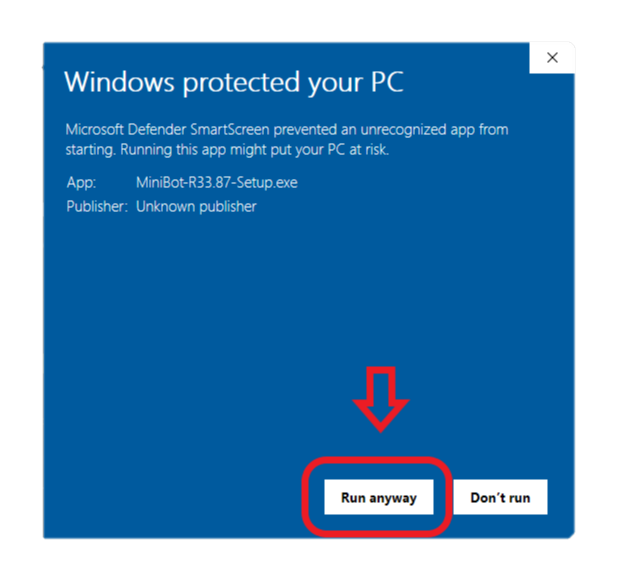
Only continue if the file came from the official MiniBot download button and its name matches the installer you expected. Screenshots are examples; your installer version may differ.
Sign in or register for a MiniBot account.
Subscribe to MiniBot Pro and wait for active access to appear on your account.
Once your subscription is active, the website enables the Windows download button.
The desktop application independently verifies your license after installation.