


Only this MiniBot-launched Minibia client uses the chosen VPN route. Your whole PC is not switched to Proton VPN.
What changes—and what does not
MiniBot’s Settings → WireGuard VPN section provides per-client routing for the standalone Minibia client launched by that MiniBot instance. It does not turn on a system-wide VPN. Your normal browser, other apps and independently launched clients keep their existing routes unless you configure them separately.
Download a WireGuard configuration
Sign in to Proton VPN, open Downloads → WireGuard configuration, choose a server and download a .conf file. Proton's Free plan supports configuration downloads, but the available server and advanced options are limited. You can use another provider that supplies compatible WireGuard configurations.
Official Proton VPN instructions (external site)
Import the profile in MiniBot
Open MiniBot → Settings → WireGuard VPN. Select Import .conf, choose the downloaded configuration and press Refresh if the new profile is not shown. Pick it from the VPN profile dropdown. Keep your VPN configuration file private: it can contain tunnel credentials.
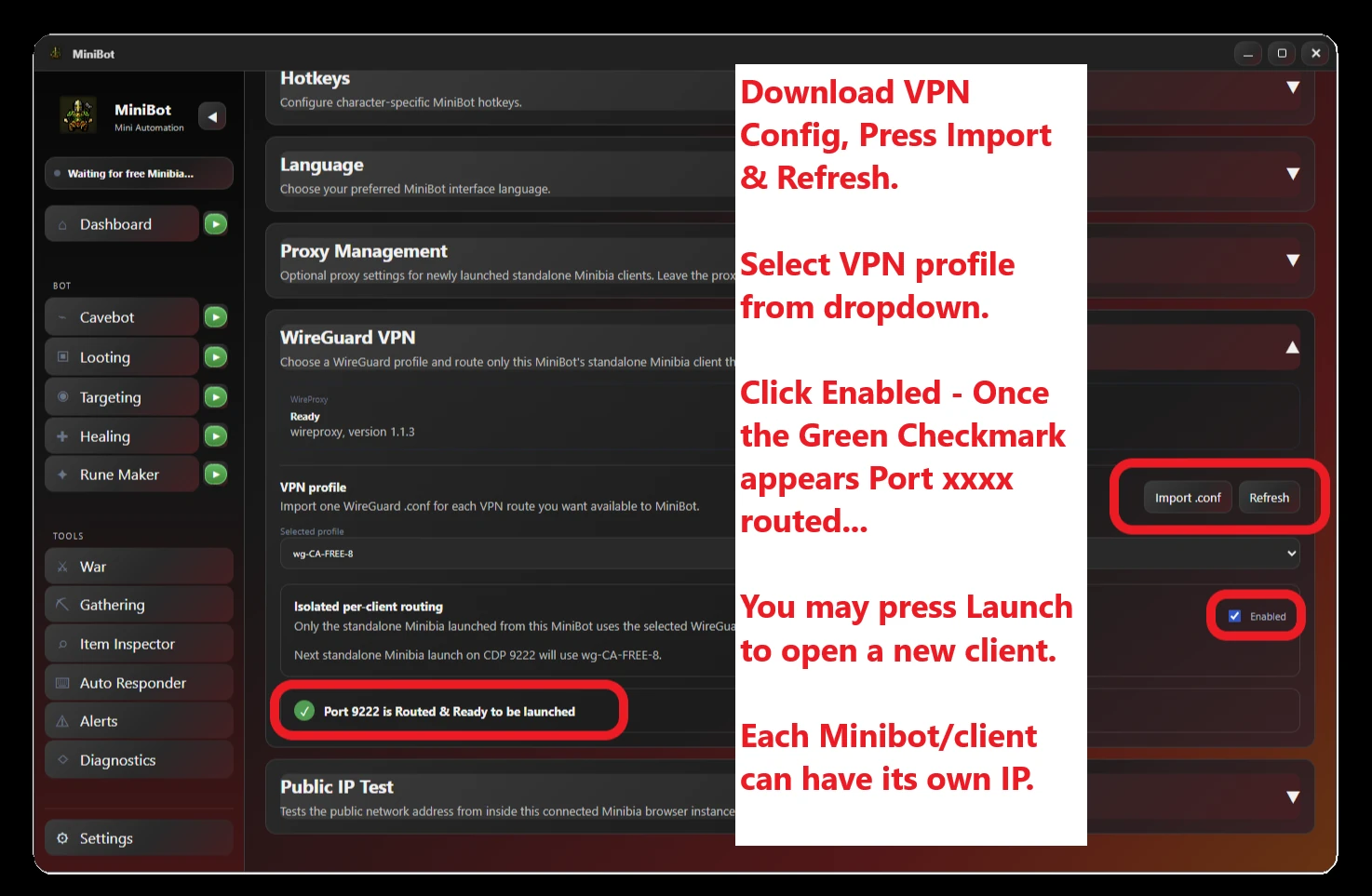
MiniBot Settings → WireGuard VPN · Import, choose a profile, enable routing and launch a new client.
Enable routing and launch Minibia
Select Enabled, then wait for the green “Port #### is Routed & Ready to be launched” indicator. Press Launch to start a new standalone Minibia client using this route. In Settings → Public IP Test, check the IP from inside that connected Minibia client. A green status indicates a route is prepared; the IP test is the stronger verification that traffic exits via the intended endpoint.
Different IPs for different clients
You can run separate MiniBot instances with their own WireGuard profiles for separately launched Minibia clients. To obtain different public IPs, select profiles that actually exit through different VPN endpoints. Two configuration files can still share the same external IP; verify each client's address individually. For an already-open game client, a new profile choice does not automatically reroute it—launch a new standalone client after enabling the selected profile.
Check your routed client
After launching, use Public IP Test to verify the address for each Minibia client.