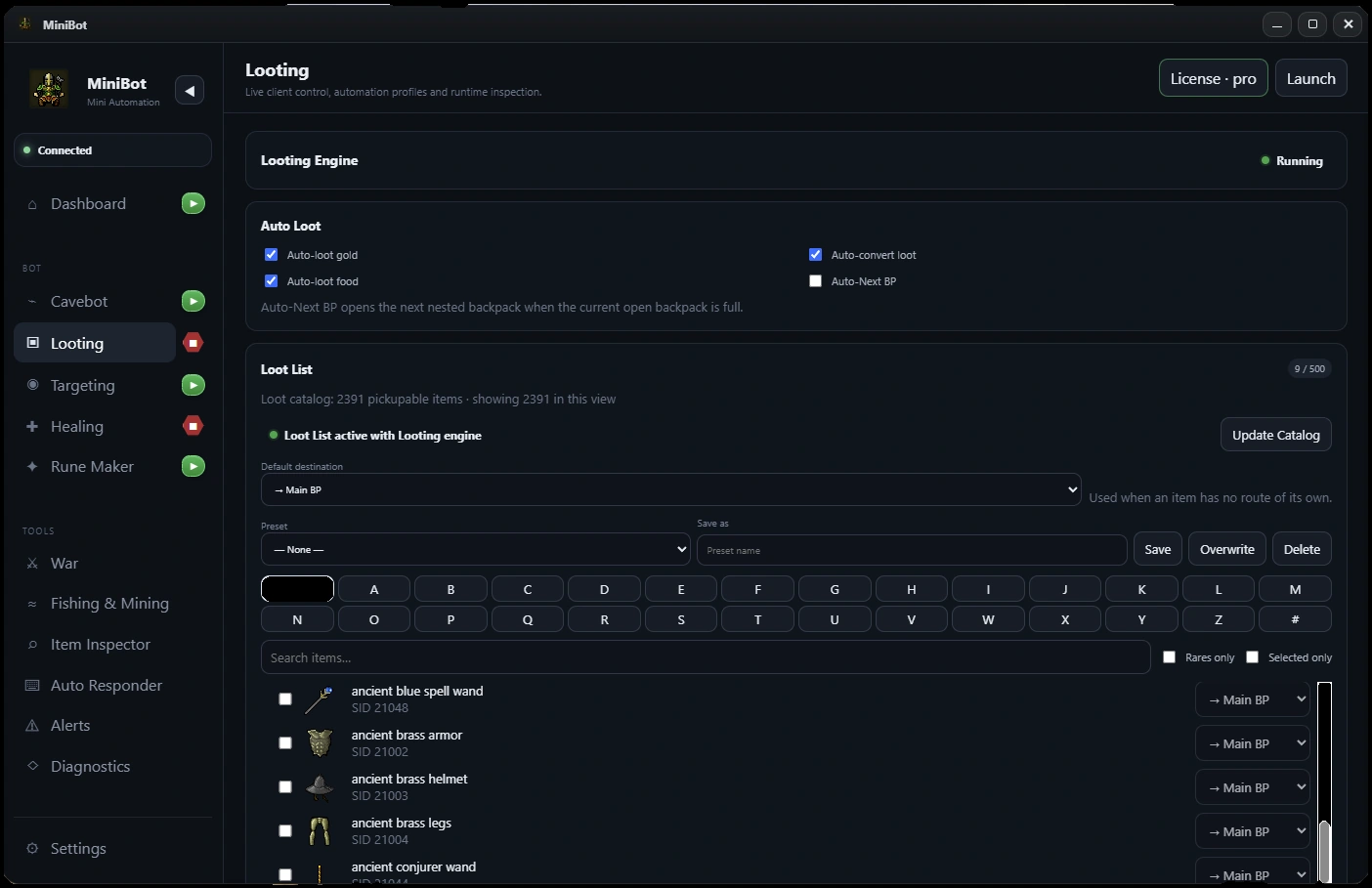
Verify your loot destinations first
Open the MiniBot Looting section and review the backpack configuration. Confirm which backpack should receive items before testing corpse pickup. A visible corpse and a successful item transfer are two different things; troubleshooting is much easier when your destinations are clear.
Start with a small loot list you can verify quickly instead of a large inventory of unfamiliar item names.
Understand the corpse queue
When combat ends, Smart Looting coordinates death candidates, corpse tiles and item processing. Some corpses may be inaccessible, delayed or stacked on the same tile. A recognized target is not a guarantee that a corpse is immediately available to open.
Test with one creature first, then with several defeats close together. Note whether the character visits the expected tile, opens the correct corpse and continues its route after the attempt.
Configure what gets collected
Use the loot list to specify which items matter for your hunt. Keep creature and item names consistent with the game’s current display. Depending on your inventory and backpack setup, routing can be more important than the number of items in the loot list.
- Choose a familiar creature and a few easily recognizable items.
- Set an available backpack destination.
- Confirm the corpse is opened and that the intended items move.
- Add more loot entries only after the simple test works.
Test the handoff with Cavebot and Targeting
Test Targeting and Looting as separate systems, then enable your Cavebot route. Watch whether navigation resumes correctly after a corpse attempt and whether repeated deaths create a backlog.
For crowded hunting areas or stacked corpses, begin with short, supervised tests. If the wrong body is reopened or a corpse is missed, record the precise tile and action-log sequence rather than changing several timing settings at once.
Plan inventory capacity and a depot route
Looting can fill backpacks and reduce free capacity. Use your Auto Depositor setup and supply checks to define what happens when the hunting inventory reaches its limits. A working loot list without a return route is not yet a full hunting workflow.
Before you enable a longer session
- Confirm destination backpacks are available
- Test one creature and a short loot list
- Verify corpse tile, opening and item movement separately
- Watch Cavebot resume after looting
- Connect capacity checks to a depot plan
MiniBot is not affiliated with or endorsed by Minibia. Minibia’s published rules prohibit cavebotting and other non-native automation. Features may not work in every situation; review the game rules before use.